A Pine Services Group Company.

Inixion

Sage Intacct vs. Sage 50: A financial reporting showdown

Picking the right financial reporting system affects how fast your team closes the books and how well leaders make decisions. This article compares Sage Intacct and Sage 50 across architecture, reporting, automation, pricing, integrations, and real-world experience so you can see which aligns with your organisation’s needs.

Key takeaways

  • Sage Intacct is cloud-native, scalable, and suitable for mid-sized to large organisations
  • Sage 50 is desktop-first, ideal for small businesses with straightforward accounting needs
  • Sage Intacct offers real-time dashboards and multi-dimensional reporting for advanced financial insights
  • Sage 50 provides reliable, static reports for basic financial reporting requirements
  • Intacct automates billing and reconciliation, reducing manual effort and errors
  • Sage 50 relies more on manual processes, which can increase close cycle times
  • Sage Intacct uses a subscription model, allowing scalable capacity and predictable costs
  • Sage 50’s one-time license can lead to higher total ownership costs with upgrades
Sage-Intacct-Financial-Reporting

What are the core financial reporting differences between Sage Intacct and Sage 50?

Sage Intacct and Sage 50 target different users, and that focus shows up in their reporting capabilities. Knowing these differences helps organisations choose a platform that supports their size, complexity, and growth plans.

Architecture and scalability

Sage Intacct is cloud-native and built to scale, making it a strong fit for mid-sized and larger organisations. Its architecture supports multi-entity setups, so you can manage subsidiaries and consolidated reporting more smoothly. By contrast, Sage 50 is a desktop-first product, which can create limits as transaction volumes, users, or entity complexity increase. In practice, Intacct handles growth with less friction; Sage 50 may require upgrades or reconfiguration to keep pace.

Reporting capabilities

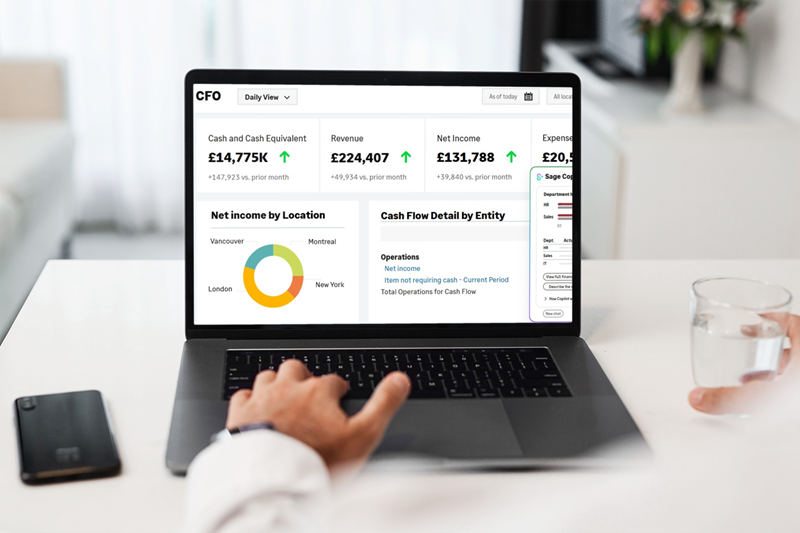
Sage Intacct delivers real-time dashboards and multi-dimensional reporting that let you slice financial data by department, project, location, or custom dimensions. That flexibility speeds analysis and improves visibility. Sage 50 offers reliable, more static reports suited to straightforward needs, but it can struggle to deliver the dynamic, up-to-the-minute insight larger organisations often require.

Automation and efficiency

Automation is where Intacct often pulls ahead. It streamlines tasks like billing, revenue recognition, and month-end reconciliation, cutting manual effort and reducing errors, so finance teams can focus on analysis instead of repetitive work. Sage 50 relies more on manual processes, which can lengthen close cycles and increase the risk of mistakes as volumes grow.

Which financial management features distinguish Sage Intacct from Sage 50?

Both products have strengths tailored to their target users. The choice comes down to whether you prioritise advanced reporting and automation or a simple, cost-effective accounting tool for basic needs.

What advanced reporting capabilities does Sage Intacct offer?

Sage Intacct supports live, multi-dimensional dashboards and highly customisable reports, so you can view performance from multiple angles in real time. It also automates core processes like billing and revenue recognition to improve accuracy and speed. Organisations that need granular, timely insight into financial performance will benefit from this level of reporting sophistication.

How do Sage 50 features support small business accounting needs?

Sage 50 is built for small businesses that need straightforward accounting: invoicing, expense tracking, payroll add-ons, and basic reporting. Its interface is familiar and easy to learn, which keeps training time low. While it lacks Intacct’s advanced analytics and automation, it provides a practical, lower-cost option for organisations with simpler financial needs.

The shift from Sage 50 to Sage Intacct is primarily about moving from backwards-looking bookkeeping to forward-looking financial management.

While Sage 50 is a reliable tool for basic accounting, its “flat” architecture often creates bottlenecks for growing teams.

Below is a breakdown of the common Sage 50 pain points and how Sage Intacct’s features resolve them.


Sage 50 pain point Sage Intacct feature / benefit The impact
Manual data consolidation:
Multiple entities require logging in/out of separate companies and manual Excel merges.
Continuous consolidation:
Natively handles multi-entity and inter-company transactions in real-time.
Close the books up to 80% faster without manual spreadsheet errors.
Bloated chart of accounts:
Needs a new account code for every department, location, or project (e.g., 5000-01-001).
Multi-dimensional GL:
Uses “Dimensions” (tags) to track data without expanding the GL.
A lean, manageable Chart of Accounts that provides granular detail.
Static, delayed reporting:
Reports are often days or weeks old because they require manual export and formatting.
Real-time dashboards:
Live data visualisations that update automatically as transactions occur.
Decision-makers see instant financial and operational KPIs.
Lack of “slicing & dicing”:
Reporting is limited to “Actuals vs. Budget” with little ability to filter by non-financial data.
Custom report writer:
Allows users to “slice and dice” by any dimension (Employee, project, vendor, etc.).
Switch from “what happened?” to “why did it happen?” in seconds.
Information silos:
Limited integration with CRMs or Payroll leads to double-entry and data gaps.
Open API / marketplace:
Seamless bi-directional sync with tools like Salesforce, ADP, and Bill.com.
A “single source of truth” across the entire business ecosystem.
Desktop/VPN limitations:
Access is restricted to specific hardware or slow, clunky remote desktops.
True cloud architecture:
100% web-based; accessible from any device without a VPN.
Full productivity for remote teams with no IT hardware maintenance.
Transaction lag:
System performance degrades significantly as transaction volume or user count increases.
Enterprise scalability:
Built on a robust database designed for millions of transactions
The system stays fast and responsive, regardless of your growth rate.

The most significant difference is the Dimensional Chart of Accounts.

In Sage 50, if you have 5 departments and 5 locations, you might need 25 accounts for a single expense. In Sage Intacct, you have one account and simply tag it with two dimensions. This allows you to drill down into the “who, what, and where” of every pound without getting lost in a massive spreadsheet.

Beyond the structural shift from segments to dimensions, there are a few “power features” in Sage Intacct that might feel like magic to someone coming from the world of Sage 50. These are the features that transform the finance team from “historians” into “strategic advisors.”

Here are the reporting gems that truly separate the two:

  1. Statistical Accounts (The “Context” gem)

In Sage 50, you only track currency (£). In Sage Intacct, you can track non-financial data like headcount, square footage, number of hospital beds, or units shipped, right in the General Ledger.

  • The Sage 50 way: You export your P&L to Excel, manually type in your headcount from a separate HR report, and calculate “Revenue per Employee.”
  • The Intacct gem: You create a “Statistical Account” for headcount. Intacct automatically calculates KPIs like Revenue per Employee or Utility Cost per Square Foot directly on your dashboard.
  1. The “Click-Through” Audit Trail

Sage 50 reporting is often “dead air” – once the report is printed to a PDF, the data is static.

  • The Sage 50 way: You see a £5,000 expense that looks wrong. You close the report, go to General Ledger inquiry, search for the date, find the journal entry, and then go to a physical filing cabinet (or a separate server) to find the scanned invoice.
  • The Intacct gem: You see that same £5,000 on a digital dashboard. You click the number to see the ledger entries. You click again to see the actual AP bill. You click a third time to see the original PDF of the invoice attached to the record.
    • Total time: 10 seconds.
  1. Multi-Book reporting (The “Compliance” gem)

Most Sage 50 users struggle when they need to report on different accounting standards simultaneously.

  • The Sage 50 way: You maintain one set of books. If you need a “Tax Basis” report vs. a “GAAP” report, you usually handle the adjustments in an Excel spreadsheet at year-end.
  • The Intacct gem: Intacct allows for user-defined books. You can post a transaction to your “GAAP” book and a different depreciation entry to your “Tax” book. You can then run a side-by-side comparison report instantly.
  1. Dynamic dashboard filters

In Sage 50, if a Regional Manager wants to see their specific P&L, the controller usually has to run a filtered report and email it to them.

  • The Sage 50 way: Creating 10 different reports for 10 different department heads.
  • The Intacct gem: You build one master dashboard. You give the managers access, and they use a “Dimension Picker” (a simple dropdown) to filter the entire dashboard by their specific Department or Location.
    • The “Gem”: The Finance team stops being a “report factory” and starts providing self-service tools.
  1. Automated Inter-entity eliminations

If you have multiple companies (entities) in Sage 50, you likely have a “Due To/Due From” nightmare at the end of every month.

  • The Sage 50 way: You manually record “Company A owes Company B” entries. At month-end, you have to manually “eliminate” these so you don’t double-count revenue when looking at the whole group.
  • The Intacct gem: Intacct recognises when you are coding a transaction between two entities. It automatically creates the balancing entries and, with one click, provides a consolidated report that “wipes out” those internal trades.

How do pricing and licensing models compare between Sage Intacct and Sage 50?

Costs and licensing shape the total cost of ownership and budgeting predictability. Each product’s model reflects the audience it serves.

What are the cost structures for Sage Intacct cloud accounting?

Sage Intacct uses a subscription pricing model with tiers based on features and user counts, allowing you to scale capacity as needs change. The modular approach lets organisations start with core functionality and add capabilities over time, supporting growth without large upfront investments.

How does Sage 50’s licensing model affect the total cost of ownership?

Sage 50 is typically sold as a one-time license, which can be attractive for businesses wanting to minimise initial spend. However, as you add users, licenses, or require upgrades, ongoing costs can rise – sometimes resulting in a higher total cost of ownership compared with a subscription model that spreads costs and scales more predictably.

What integration and scalability considerations should enterprises evaluate?

Integration and scalability determine how well a system fits into your broader technology stack and long-term plans. Each platform offers different options.

How does Sage Intacct integrate with other enterprise systems?

Sage Intacct offers an open API and prebuilt connectors, making it straightforward to integrate with CRMs, payroll, procurement, and other enterprise systems. That connectivity helps you centralise financial data and maintain consistent processes across applications.

What are the scalability constraints of Sage 50 for growing businesses?

Sage 50 serves small businesses well, but its desktop design can limit user access, multi-entity reporting, and handling of higher transaction volumes. For organisations planning rapid growth or complex entity structures, Sage Intacct is often the more future-proof choice.

What insights do user reviews and case studies provide on financial reporting efficiency?

Customer feedback and case studies reveal how each product performs in real-world finance operations, especially around close times, accuracy, and productivity.

What ROI improvements have enterprises achieved with Sage Intacct?

Many organisations report faster close cycles, less reconciliation work, and measurable productivity gains after moving to Sage Intacct. Automation and real-time reporting are frequently cited drivers of improved ROI, allowing finance teams to deliver timely insights and support strategic decisions.

How do small businesses rate Sage 50’s reporting and usability?

Small businesses praise Sage 50 for its ease of use and solid basic reporting. Reviewers appreciate its straightforward workflows and low learning curve. That said, some users note limitations when they need deeper analytics or more flexible reporting formats.

Conclusion

Choosing between Sage Intacct and Sage 50 comes down to scale, complexity, and long-term goals. Sage Intacct delivers cloud-based automation, real-time reporting, and scalability for mid-sized to large organisations. Sage 50 remains a solid, user-friendly option for small businesses with straightforward accounting needs. Evaluate your reporting requirements, integration needs, and growth plans to pick the solution that best supports your financial operations.

Do take a look at our selection of guides and papers to help you navigate Sage Intacct.

  1. Sage Intacct – 7 Signs you’ve outgrown spreadsheets
  2. Sage Intacct – Cloud accounting software checklist
  3. Sage Intacct –  Product guide

If you would like to discuss your project with us, please  contact our teamor  book a Sage Intacct demo.

FAQs

Which industries are most likely to benefit from Sage Intacct’s scalability features?2026-01-07T09:37:30+00:00

Industries that typically benefit include services-based businesses such as professional services and private equity-backed, transportation etc. These sectors face multi-entity, multi-currency and project-level complexity where Sage Intacct’s cloud architecture, automation and dimensional reporting provide clear operational and reporting advantages.

What role does automation play in enhancing financial operations with Sage Intacct?2026-01-07T09:36:36+00:00

Automation streamlines repetitive tasks like invoice processing, reconciliations and reporting, cutting manual entry and error risk. That frees finance to focus on analysis and decision support. Automated workflows also strengthen control and compliance while enabling quicker responses to operational issues.

How can businesses measure the success of their migration to Sage Intacct?2026-01-07T09:35:32+00:00

Measure success with KPIs such as time-to-close, headcount efficiency and reporting accuracy. Track reductions in manual processes and the speed of consolidated reporting and collect user feedback to evaluate adoption and identify optimisation opportunities.

How does Sage Intacct enhance financial reporting compared to Sage 50?2026-01-07T09:34:06+00:00

Sage Intacct delivers multi-dimensional reporting, real-time dashboards and drill-down capabilities that go beyond Sage 50’s standard reports. These features let teams analyse by department, project or location and produce stakeholder-ready reports more quickly. Built-in automation also reduces manual reconciliations, improving accuracy and the timeliness of financial information.

What factors should businesses consider when deciding to upgrade from Sage 50 to Sage Intacct?2026-01-07T09:28:09+00:00

When weighing an upgrade, review operational triggers such as repeated manual processes, rising transaction volumes and the need for near-real-time reporting. Factor in strategic goals, entering new markets or managing multiple entities, and assess integration complexity. A structured migration plan that includes data cleansing, user training and stakeholder engagement is essential to keep disruption to a minimum.

What is the typical pricing difference between Sage Intacct and Sage 50?2025-12-13T09:59:17+00:00

Sage 50 usually follows a desktop licence model with lower entry cost for small businesses. Sage Intacct generally uses subscription and modular pricing aligned to required modules and user counts for mid‑market organisations. Subscription costs can look higher initially but often yield lower total cost of ownership over time through automation, reduced manual work and removal of third‑party consolidation tools. Organisations should weigh pricing against expected efficiency gains and scalability needs.

  • Migration readiness: Assess consolidation needs and reporting pain points before deciding
  • ROI focus: Prioritise KPIs such as close time and manual reconciliation hours when evaluating vendors
  • Partner selection: For complex migrations, choose an implementation partner experienced in multi‑entity deployments

Following these steps helps ensure the technical choice aligns with strategic growth objectives and operational realities.

How does Sage Intacct support multi entity and multi currency financial management?2025-12-13T09:58:26+00:00

Intacct supports native consolidation across legal entities with automated intercompany eliminations and dimension based reporting to simplify group accounting. Automated currency translation and configurable exchange rate handling streamline multi currency reporting. These built in capabilities help finance teams produce consolidated statements and investor packs faster and with greater confidence, improving auditability and cutting manual consolidation work.

Why do businesses outgrow Sage 50 and choose Sage Intacct?2025-12-13T09:57:19+00:00

Businesses typically outgrow Sage 50 when manual consolidations increase, spreadsheet dependency grows, month end slows or advanced needs like project accounting and revenue recognition appear. Intacct addresses these limits with native multi entity support, automation and real time analytics that reduce manual effort and strengthen controls. The practical result is faster access to reliable management information and lower reporting risk.

What is the main difference between Sage Intacct and Sage 50?2025-12-13T09:56:43+00:00

The core difference is architecture and scale: Sage Intacct is a cloud native, scalable financial management platform built for multi entity, high volume operations; Sage 50 is a desktop accounting package aimed at single entity small businesses. That architectural gap affects reporting, automation, integration and suitability for growth. Organisations needing consolidated reporting, automation and strong integrations will generally favour Intacct for long term fit.

What does cloud-native mean?2025-07-31T16:24:21+00:00

Cloud-native means the solution is purpose-built for the cloud, not simply hosted there. It gives you secure, browser-based access to your data anytime, anywhere, from any internet-connected device. By eliminating the need to manage on-premises infrastructure, it also frees up time and resources to focus on strategic priorities.

What are the biggest improvements I’ll notice with Sage Intacct?2025-07-31T15:36:45+00:00

You should see immediate improvements in automation, faster month-end close, simplified consolidations, custom reporting, and better real-time visibility across your finances, all within a secure, cloud-native environment.

How easy is it to migrate from Sage 50 to Sage Intacct?2025-07-01T08:25:06+00:00

With a trusted partner like Inixion, the transition is seamless. We follow a structured migration process that includes data cleansing, system configuration, training, and go-live support, ensuring minimal disruption to your operations.

Why should I move from Sage 50 to Sage Intacct?2025-07-30T13:17:20+00:00

Sage 50 is ideal for smaller businesses, but it often lacks the scalability, automation, and multi-entity capabilities that growing companies need. Sage Intacct is a modern cloud-native solution that offers real-time reporting, automation, and the flexibility to support your evolving financial needs.

How long does it take to implement Sage Intacct?2026-07-28T13:28:06+00:00

Implementation timelines vary based on business complexity, but small to mid-sized businesses typically go live within 2-4 months. Our experienced consultants ensure a fast, efficient deployment tailored to your needs.

Go to Top