Sage Intacct system performance review
A practical look at what a Sage Intacct system performance review can uncover, from reporting and month-end processes to dashboards, automation and everyday adoption.
Sage Intacct may have been the right solution when you implemented it. But businesses change. Teams grow, reporting needs become more complex, and processes that once worked well can start to feel unnecessarily manual.
That does not necessarily mean you need a major reimplementation. Often, the opportunity is much simpler: review how Sage Intacct is being used today, identify a few practical improvements and help your finance team get more value from the solution you already have.
Interested in learning more about our complimentary Sage Intacct system performance review? Learn more here.
What is a Sage Intacct system performance review?
A Sage Intacct system performance review is a structured look at how the solution supports your finance team now, not how it was originally expected to work. It considers configuration, processes, reporting and user adoption, then highlights where small changes could make day-to-day work easier.
The aim is not to find fault. It is to answer a straightforward question: Are you getting the best possible value from Sage Intacct for the way your business operates today?
A useful review should explore areas such as:
- How long month-end takes and where delays occur
- Which reports still need to be manipulated outside Sage Intacct
- Whether dashboards give each user the information they actually need
- Where approvals, data entry or reconciliations remain unnecessarily manual
- How dimensions are being used for analysis and reporting
- Whether integrations and workflows still suit the business
- Where users may benefit from additional training or a simpler process
Five signs you may not be getting the full value from Sage Intacct
- Month-end still feels heavier than it should
Financial close automation should remove repetitive work and improve control, but technology alone does not guarantee a faster close. If the team still relies on trackers, manual hand-offs or repeated checks outside the system, it is worth understanding why.
A performance review can help separate genuine process requirements from workarounds that have simply become part of the monthly routine. The result may be a clearer close process, better ownership and fewer avoidable steps.
- Reporting still ends in Excel
Spreadsheets will always have a place in finance. The warning sign is when every management report has to be exported, rebuilt or manually combined before anyone can use it.
Sage Intacct offers flexible, dimensional reporting, but the structure has to reflect the questions your organisation needs to answer. A review can identify reports that should be redesigned, simplified or made available directly to the people who need them.
- Dashboards are present, but not genuinely useful
A dashboard only adds value if it helps someone make a decision. Generic dashboards, too many measures or outdated KPIs can leave users ignoring them altogether.
Well-designed dashboards can provide near-real-time financial insights without asking finance to produce another spreadsheet. The right view for a CFO will not be the same as the right view for a budget holder, project lead or entity manager. Reviewing these needs by role can make Sage Intacct far more useful across the business.
- Growth has made the original setup less suitable
Perhaps you have added entities, changed reporting lines, expanded internationally or introduced new revenue streams. Sage Intacct scalability is a strength, particularly for multi-entity organisations, but your configuration and processes still need to evolve as the business does.
If multi-entity consolidation takes longer than expected, intercompany activity creates extra work or group reporting does not give you the right level of detail, the issue may be the way the solution has developed over time rather than a limitation of the solution itself.
- Different users have developed different workarounds
When people are busy, they find a way to get the job done. Over time, that can create duplicate spreadsheets, inconsistent processes and knowledge that sits with one person. A good review listens to the people using Sage Intacct every day. It can reveal whether the answer is a configuration change, better guidance, targeted training or simply agreeing one consistent way of working.
What should the Sage Intacct review measure?
There is no single score that proves Sage Intacct is performing well. The most useful measures are the ones that matter to your own finance team and leadership.
| Area | Useful questions to ask |
| Month-end | How many working days does close take? Where are the repeated delays or manual checks? |
| Reporting | Which reports need offline manipulation? How quickly can leaders get the numbers they trust? |
| Automation | Which high-volume or repetitive activities could be streamlined? |
| Visibility | Do dashboards and reports provide useful, role-relevant information? |
| Multi-entity | How efficient are consolidation, intercompany processes and entity-level drill-down? |
| Adoption | Are teams using the solution consistently and confidently? |
| Value | Is Sage Intacct ROI visible through saved time, stronger control or better decisions? |
How a review supports Sage Intacct ROI
Sage Intacct ROI is not only about reducing licence or administration costs. It can also be seen in time returned to the finance team, greater confidence in reporting, improved controls and quicker access to information.
Before making changes, it helps to establish a simple baseline. For example:
- Current number of working days to close
- Hours spent preparing recurring reports
- Number of manual journal, approval or reconciliation steps
- Reports regularly created outside Sage Intacct
- Common support questions or areas of low user confidence
This makes it possible to prioritise improvements and later assess whether they have made a meaningful difference. It also prevents the review from becoming a long wish list with no clear business outcome.
A performance review should be practical, not overwhelming
You may already know that parts of Sage Intacct could work better, but not know where to begin. Or you may be too close to the existing processes to see what could change. An independent view can help.
At Inixion, our Intacct consultants are ex-finance leaders, including a former Finance director and a financial controller. They are people who have worked in senior finance roles themselves. They understand that a finance team cannot pause business as usual while every possible improvement is explored. The most useful review is therefore focused and realistic: what would make the biggest difference, what could be improved quickly and what may need a longer-term plan?
Inixion has delivered every project successfully since 2006 and has zero attrition across its consultancy and technical team. That continuity matters because our customers work with experienced people who understand both the solution and the operational reality behind it.
What you receive from Inixion’s complimentary review
Our complimentary Sage Intacct performance review is designed for organisations already using Sage Intacct that want a clear, expert view of where it could work better.
- A short pre-review call to understand your priorities
- A focused 60-minute review with an experienced Sage Intacct consultant
- Discussion across reporting, month-end, dashboards, adoption, approvals, dimensions and integrations
- A concise one-page summary of the five most useful improvement opportunities
- Practical quick wins and, where relevant, an optional longer-term roadmap
Could Sage Intacct work harder for your finance team?
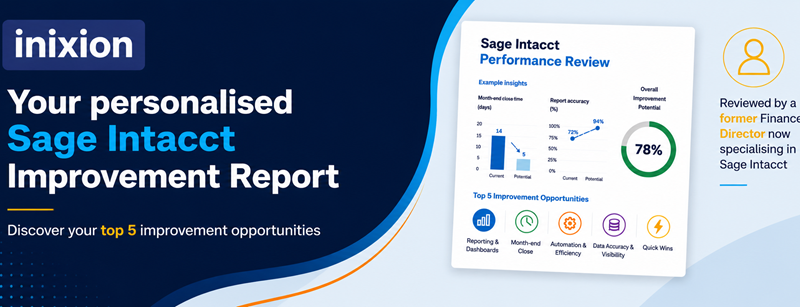
Book your complimentary Sage Intacct performance review and receive a clear, practical summary of where you could improve.